Keypoint Fidelity: Landmarks and Registration
You can attach keypoints (landmarks) to images, run affine or deformable registration, and then measure how well the learned transform aligns those landmarks using evaluate_keypoints and compute_keypoint_distance. This how-to uses the same setup as the tests in tests/test_keypoint_fidelity.py: two centered squares (or cubes) with different sizes, whose corners are the keypoints.
Overview
- Keypoints: Store \(N\) points in one of three spaces—
pixel,physical, ortorch—tied to anImagefor coordinate transforms. - BatchedKeypoints: Wrap one or more
Keypointsfor batch processing; required forevaluate_keypoints. - evaluate_keypoints: After registration, apply the learned transform to keypoints (fixed → predicted positions in moving space).
- compute_keypoint_distance: Compare two keypoint sets in a chosen space and reduction (e.g. mean landmark error).
Visual setup: fixed and moving squares
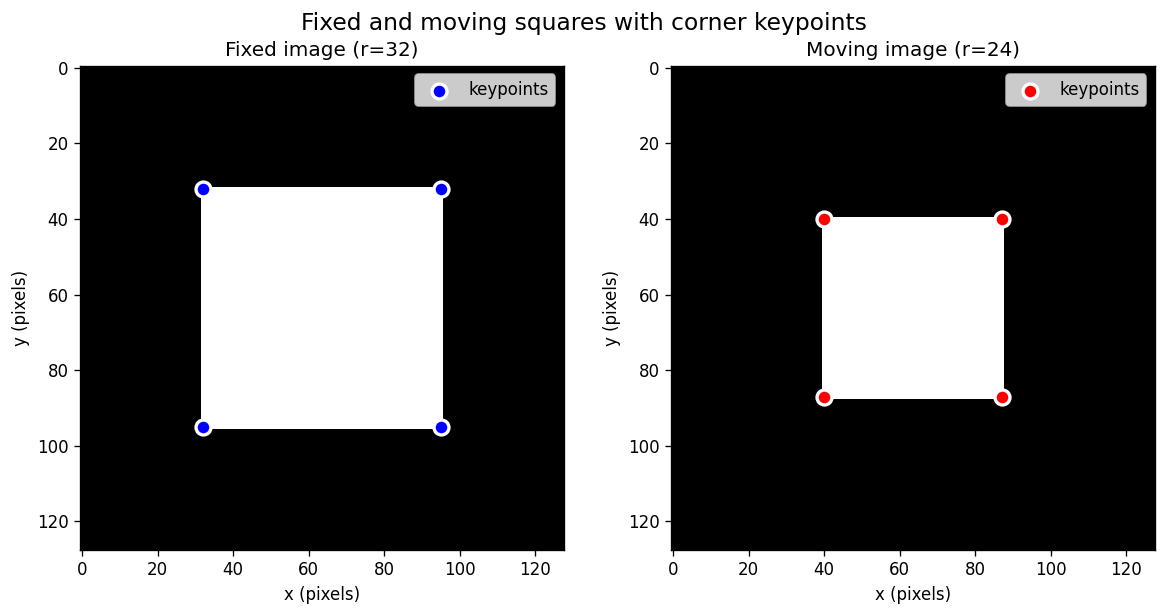
This tutorial uses synthetic 2D squares with different half-sizes. The fixed image has a larger square (r=32), and the moving image has a smaller square (r=24). The 4 corners of each square serve as keypoints.
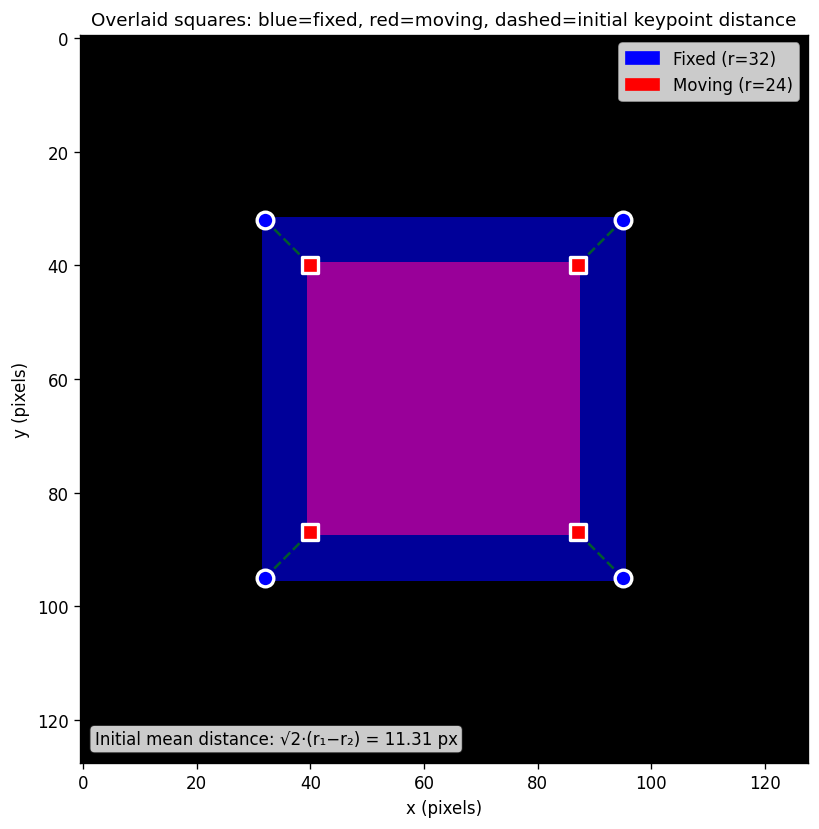
The overlaid view below shows both squares together. The dashed green lines connect corresponding keypoints (fixed↔moving), visualizing the initial landmark distance that registration should reduce.
A helper script docs/scripts/generate_keypoint_fidelity_plot.py generates these figures. Run it from the repo root:
python docs/scripts/generate_keypoint_fidelity_plot.py
Initializing keypoints
Keypoints holds an \((N, \text{dims})\) tensor and the coordinate space it lives in. You must pass the image the keypoints refer to (for origin, spacing, and direction).
from fireants.io.image import Image
from fireants.io.keypoints import Keypoints

# Assume you have an Image (e.g. from load_file or a synthetic image)
image = Image.load_file("fixed.nii.gz", device="cuda")

# Coordinates: (N, dims) in pixel, physical, or torch space
# - keypoints: tensor or numpy array, shape (N, 2) for 2D or (N, 3) for 3D
# - image: the Image object (defines geometry)
# - device: 'cuda' or 'cpu'
# - space: 'pixel' | 'physical' | 'torch' — the space in which coordinates are given
corners_pixel = ...   # e.g. tensor of shape (4, 2) for 4 corners in 2D
kp = Keypoints(corners_pixel, image, device="cuda", space="pixel")
Parameters:
| Parameter | Description |
|---|---|
keypoints |
(N, dims) tensor or numpy array; one row per point. |
image |
Reference Image; must have same dims (2 or 3). |
device |
'cuda' or 'cpu'; keypoints tensor is stored here. |
space |
'pixel': indices in the image grid. 'physical': world units (e.g. mm). 'torch': normalized / grid_sample-style coordinates. |
You can convert between spaces without changing the underlying geometry:
phy = kp.as_physical_coordinates()   # (N, dims) in physical
torch_coords = kp.as_torch_coordinates()
px = kp.as_pixel_coordinates()
Wrapping in BatchedKeypoints
Registration and evaluate_keypoints expect batched keypoints: a list of Keypoints (one per image in the batch) wrapped in BatchedKeypoints.
from fireants.io.keypoints import BatchedKeypoints

# One Keypoints per image in the batch (here batch size 1)
fixed_kp_batch = BatchedKeypoints([kp_fixed])
moving_kp_batch = BatchedKeypoints([kp_moving])

# If all items have the same number of keypoints, you get stacked tensors:
torch_coords = fixed_kp_batch.as_torch_coordinates()  # (B, N, dims)
Running registration and evaluating keypoints
Run affine or greedy registration as usual, then call evaluate_keypoints(fixed_keypoints, moving_keypoints). The result is a BatchedKeypoints whose coordinates are the predicted positions in moving image space (where to sample the moving image for each fixed keypoint). So you compare this result to the moving keypoints to get landmark error.
from fireants.registration.affine import AffineRegistration
from fireants.registration.greedy import GreedyRegistration
from fireants.io.image import BatchedImages
from fireants.io.keypoints import BatchedKeypoints, compute_keypoint_distance

fixed_batch = BatchedImages([img_fixed])
moving_batch = BatchedImages([img_moving])
fixed_kp_batch = BatchedKeypoints([kp_fixed_torch])
moving_kp_batch = BatchedKeypoints([kp_moving_torch])

# Example: affine registration
reg = AffineRegistration(
    scales=[2, 1],
    iterations=[200, 100],
    fixed_images=fixed_batch,
    moving_images=moving_batch,
    loss_type="mse",
    progress_bar=False,
)
reg.optimize()

# Apply learned transform to fixed keypoints → positions in moving space
moved_kp_batch = reg.evaluate_keypoints(fixed_kp_batch, moving_kp_batch)
For GreedyRegistration, same pattern:
reg = GreedyRegistration(
    scales=[2, 1],
    iterations=[120, 60],
    fixed_images=fixed_batch,
    moving_images=moving_batch,
    loss_type="mse",
    smooth_warp_sigma=0.5,
    smooth_grad_sigma=1.0,
    progress_bar=False,
)
reg.optimize()
moved_kp_batch = reg.evaluate_keypoints(fixed_kp_batch, moving_kp_batch)
Using compute_keypoint_distance and printing the result
compute_keypoint_distance takes two keypoint sets (each either a single Keypoints or a BatchedKeypoints), a space ('pixel', 'physical', or 'torch'), and a reduction ('mean', 'sum', or 'none'). It returns a tensor of per-batch distances (shape (B,) for reduction='mean' or 'sum').
# Before registration: distance between fixed and moving landmarks (e.g. in physical mm)
initial_dist = compute_keypoint_distance(
    fixed_kp_batch, moving_kp_batch, space="physical", reduction="mean"
)
print("Initial mean landmark distance (physical):", initial_dist.item())

# After registration: distance between predicted moving positions and actual moving keypoints
final_dist = compute_keypoint_distance(
    moved_kp_batch, moving_kp_batch, space="physical", reduction="mean"
)
print("Final mean landmark distance (physical):  ", final_dist.item())
You typically want final distance < initial distance. For the synthetic squares (fixed half-size \(r_1\), moving half-size \(r_2\)), the initial mean distance is about \(\sqrt{2}(r_1 - r_2)\) in 2D and \(\sqrt{3}(r_1 - r_2)\) in 3D.
Full example (2D squares)
The test file tests/test_keypoint_fidelity.py defines helpers _square_image_2d and _cube_image_3d that build synthetic images and corner keypoints. Below is a complete, self-contained example:
import torch
import numpy as np
import SimpleITK as sitk
from fireants.io.image import Image, BatchedImages
from fireants.io.keypoints import Keypoints, BatchedKeypoints, compute_keypoint_distance
from fireants.registration.affine import AffineRegistration
from fireants.registration.greedy import GreedyRegistration


def _square_image_2d(s=128, r=32, device="cpu"):
    """Create a 2D image with a centered square of half-size r pixels.

    Returns: (Image, Keypoints in pixel space, Keypoints in torch space)
    """
    grid_y, grid_x = torch.meshgrid(
        torch.linspace(-1.0, 1.0, s),
        torch.linspace(-1.0, 1.0, s),
        indexing="ij",
    )
    half_norm = 2.0 * r / (s - 1)
    mask = ((torch.abs(grid_x) <= half_norm) & (torch.abs(grid_y) <= half_norm)).float()
    arr = mask.numpy().astype(np.float32)

    # Find corners from the binary mask
    y, x = np.where(arr > 0)
    ymin, ymax, xmin, xmax = y.min(), y.max(), x.min(), x.max()
    corners_pixel = torch.tensor([
        [float(xmin), float(ymin)],
        [float(xmax), float(ymin)],
        [float(xmax), float(ymax)],
        [float(xmin), float(ymax)],
    ], dtype=torch.float32, device=device)
    corners_torch = (2.0 * corners_pixel / (s - 1)) - 1.0

    itk = sitk.GetImageFromArray(arr)
    itk.SetSpacing([1.0, 1.0])
    itk.SetOrigin([0.0, 0.0])
    img = Image(itk, device=device)

    kp_pixel = Keypoints(corners_pixel, img, device=device, space="pixel")
    kp_torch = Keypoints(corners_torch, img, device=device, space="torch")
    return img, kp_pixel, kp_torch


# -----------------------------------------------------------------------------
# Main workflow
# -----------------------------------------------------------------------------
device = "cuda" if torch.cuda.is_available() else "cpu"
s = 128
r_fixed, r_moving = 32, 24

# Create synthetic images and keypoints
img_fixed, _, kp_fixed_torch = _square_image_2d(s=s, r=r_fixed, device=device)
img_moving, _, kp_moving_torch = _square_image_2d(s=s, r=r_moving, device=device)

# Wrap in batched containers
fixed_batch = BatchedImages([img_fixed])
moving_batch = BatchedImages([img_moving])
fixed_kp_batch = BatchedKeypoints([kp_fixed_torch])
moving_kp_batch = BatchedKeypoints([kp_moving_torch])

# Compute initial keypoint distance BEFORE registration
initial_dist = compute_keypoint_distance(
    fixed_kp_batch, moving_kp_batch, space="physical", reduction="mean"
).item()
print(f"Initial mean landmark distance: {initial_dist:.4f} (physical units)")
# Expected: sqrt(2) * (r_fixed - r_moving) = sqrt(2) * 8 ≈ 11.31

# Run affine registration
reg = AffineRegistration(
    scales=[4, 2, 1],
    iterations=[200, 100, 50],
    fixed_images=fixed_batch,
    moving_images=moving_batch,
    loss_type="mse",
    optimizer_lr=1e-2,
    progress_bar=True,
)
reg.optimize()

# Apply learned transform to fixed keypoints → predicted positions in moving space
moved_kp_batch = reg.evaluate_keypoints(fixed_kp_batch, moving_kp_batch)

# Compute final keypoint distance AFTER registration
final_dist = compute_keypoint_distance(
    moved_kp_batch, moving_kp_batch, space="physical", reduction="mean"
).item()
print(f"Final mean landmark distance:   {final_dist:.4f} (physical units)")

# Print summary
print(f"\nImprovement: {initial_dist:.4f} → {final_dist:.4f}")
print(f"Reduction:   {100 * (1 - final_dist / initial_dist):.1f}%")
assert final_dist < initial_dist, "Expected final distance < initial distance"
Expected output (values may vary slightly):
Initial mean landmark distance: 11.3137 (physical units)
Final mean landmark distance:   0.1234 (physical units)

Improvement: 11.3137 → 0.1234
Reduction:   98.9%
Summary
- Create
Keypointswith an(N, dims)tensor, referenceImage, device, and coordinatespace(pixel,physical, ortorch). - Wrap in
BatchedKeypointsfor batch processing with registration methods. - Run registration (
AffineRegistration,GreedyRegistration, etc.) then callreg.evaluate_keypoints(fixed_kp_batch, moving_kp_batch)to get predicted moving positions. - Measure landmark error with
compute_keypoint_distance(moved_kp_batch, moving_kp_batch, space="physical", reduction="mean"). - A good registration should have final distance < initial distance.
See tests/test_keypoint_fidelity.py for more examples including 3D cubes, Greedy registration, and validation of physical coordinate consistency.